How to Read a Trading Signal Before You Risk Money
Your phone buzzes. A setup just fired on a stock you've been watching. Your finger hovers over the brokerage app. That moment — the gap between the alert and the order — is where most beginner traders lose money. Not because the signal was bad. Because they skipped the five things you need to check before a signal becomes a trade.
This guide walks through exactly what to read on a trading signal before you commit capital. No hype, no shortcuts. Just the five checkpoints that separate a systematic trader from someone gambling on a notification.
The Alert Is Not the Trade
This is the single most important mindset shift for anyone learning how to read a trading signal. An alert tells you that a stock has matched a set of technical conditions right now. It does not tell you to buy. It tells you to pay attention.
Think of it like a smoke detector. The alarm means "go check the kitchen," not "call 911 immediately." The alert is the trigger for your attention. What you do next determines whether you have an edge or just a habit of reacting.
Most retail traders skip the reading step entirely. The alert fires, the chart looks clean, and the order goes in. Sometimes it works. Often it doesn't. And because there's no framework behind the decision, there's no way to learn from either outcome.
The five checkpoints below take under two minutes once they become habit. Run through them every time, before every trade, regardless of how obvious the setup looks.
1. Check the Rule the Signal Matched
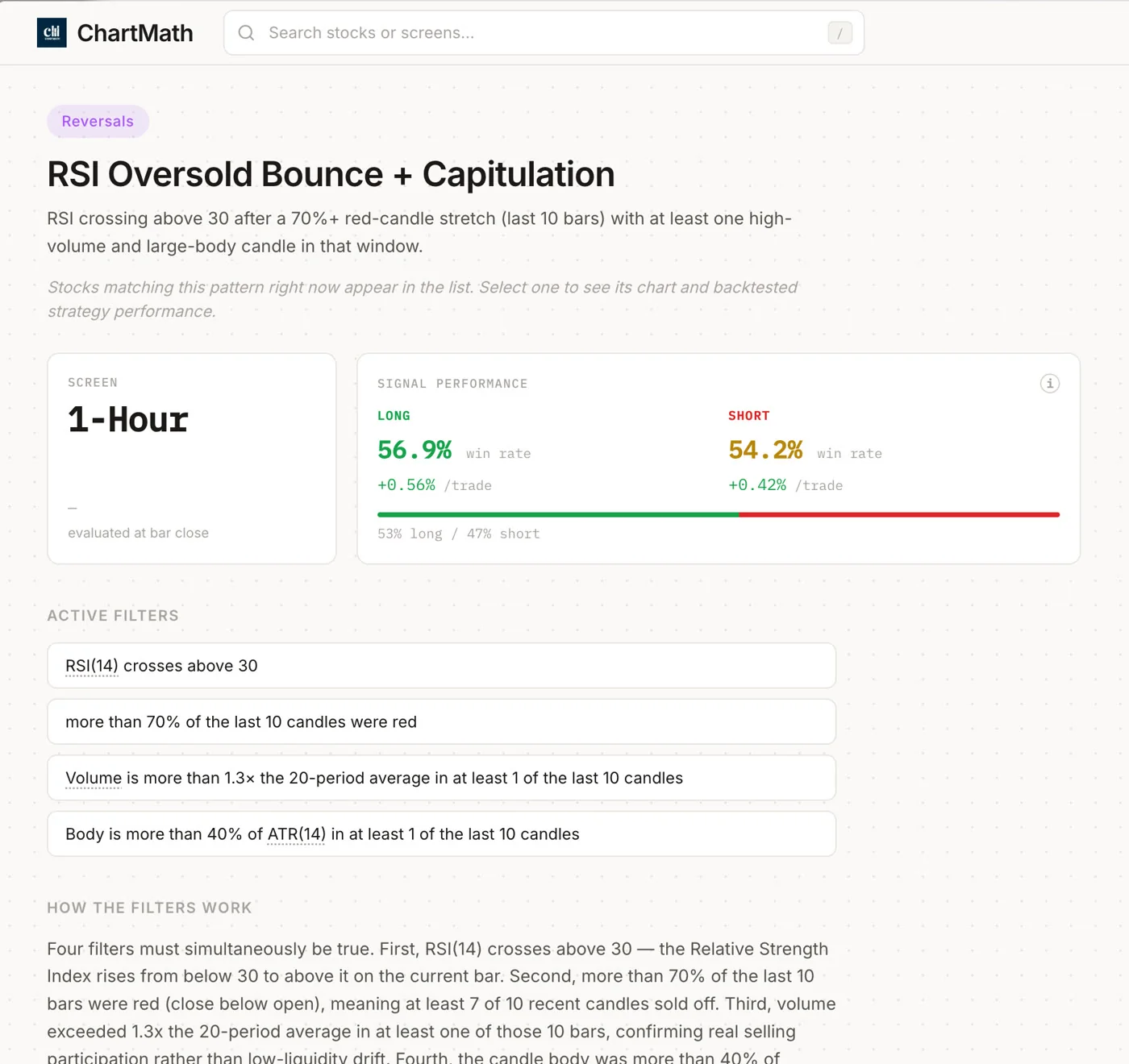
Before anything else, read the rule. Every legitimate technical screen is built on a specific set of conditions: price crossing a level, volume exceeding a threshold, an indicator reaching a value. That rule is the reason the alert fired.
If you can't explain the rule in one sentence, you shouldn't trade the signal. "It looked like a breakout" is not a rule. "Price closed above the 20-day high on volume greater than the 20-day average" is a rule. The difference matters because the rule tells you what the setup is actually measuring and what has to stay true for the trade to work.
This is one of the core problems with most retail tools. TradingView gives you a screener, but it doesn't tell you the logic behind a signal in plain English. Finviz gives you a list of tickers, but no explanation of what condition each one matched or how that condition has historically performed.
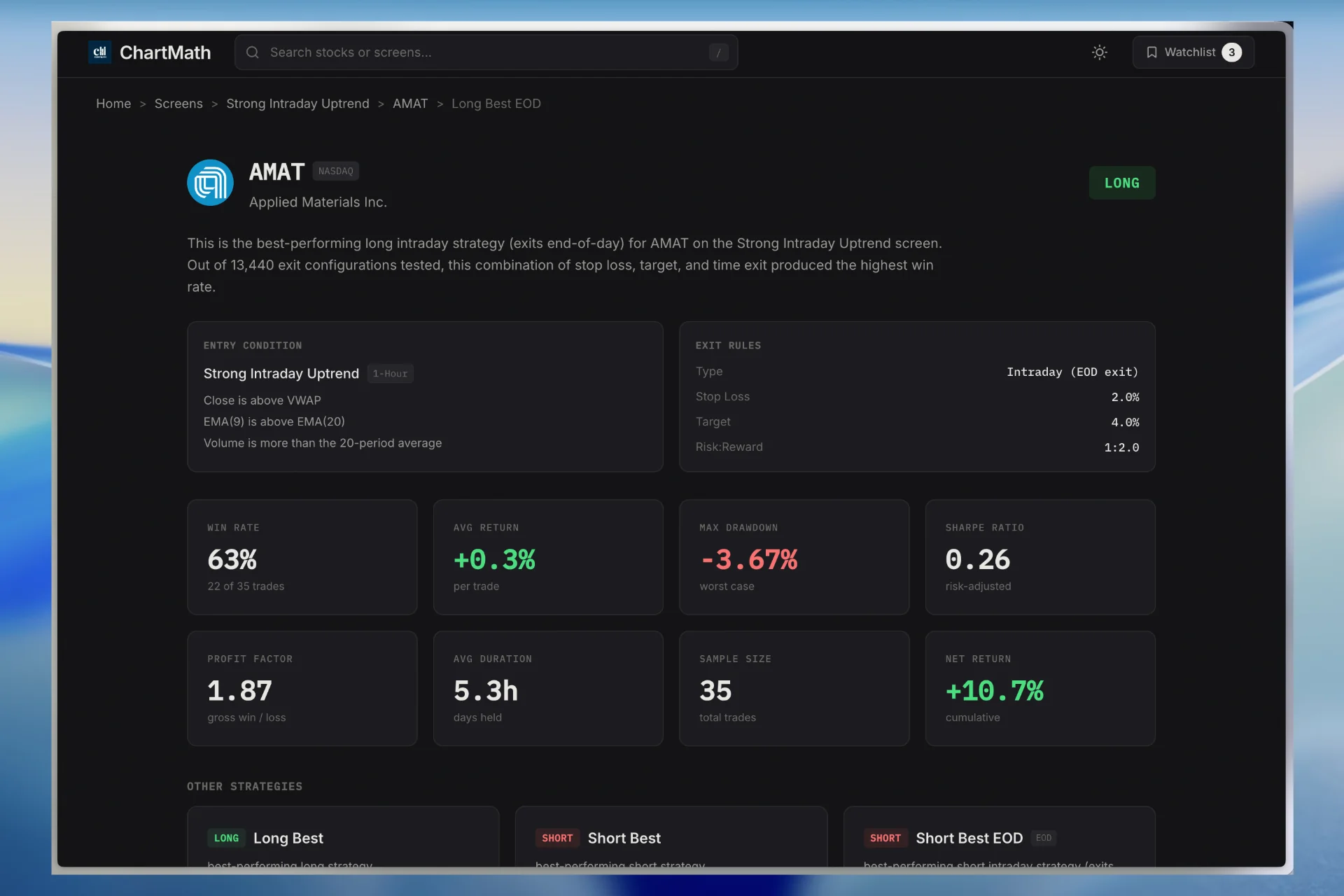
ChartMath's 200+ curated, read-only screens each come with a written description of their filter logic. You can read exactly what conditions a stock had to meet before the alert fired. That's the starting point for every signal evaluation. If you want to browse the full screen library, the web screener at chartmath.com/screens lets you read every screen's rules before you even open the app.
For a deeper look at how specific setups like VWAP reclaims work at the rule level, the VWAP Trading guide on this site is a solid starting point.
2. Check the Timeframe
A signal on the 1-minute chart and a signal on the daily chart are not the same trade. They have different holding periods, different stop distances, different volatility profiles, and different demands on your attention during market hours.
A 1-minute ORB signal might resolve in 20 minutes. A daily VWAP reclaim might take two to three days to play out. If you're at a desk job and can't monitor a position intraday, a 5-minute signal is probably the wrong timeframe for you, regardless of how good the setup looks.
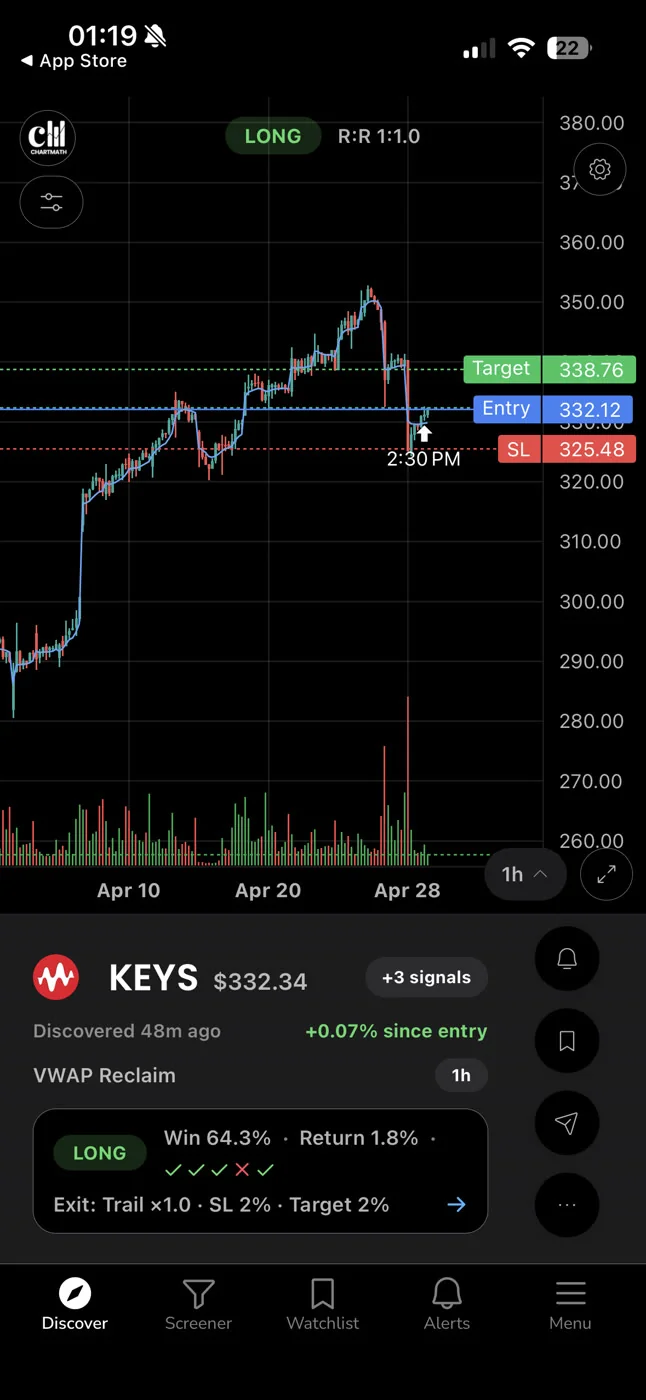
ChartMath covers 7 timeframes: 1m, 5m, 15m, 1h, Daily, Weekly, and Monthly. Each signal card shows the timeframe it fired on. That single piece of information should immediately tell you whether the trade fits your schedule.
For traders with a day job, the daily and 1h timeframes are usually the most practical. You can check the setup before market open, set your levels, and let the trade run without needing to watch every tick. If you're building a workflow around your schedule, the Swing Trading with a Full-Time Job guide covers how to structure that in detail.
3. Read the Backtested Win Rate and Average Return
This is where most retail tools fail beginners completely. A signal fires. The chart looks clean. But you have no idea whether that specific setup has historically worked 30% of the time or 65% of the time. You're making a decision with no evidence.
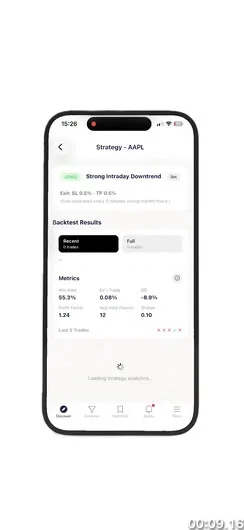
ChartMath shows three key metrics on every screen. Understanding each one is central to knowing how to read a trading signal properly.
Win Rate
Win Rate is the percentage of historical instances where the setup resolved in the expected direction. A screen with a 60% Win Rate has historically worked six times out of ten. That's useful information, but it's not the whole picture.
Average Return
Average Return tells you the typical magnitude of the wins (and losses) when the setup fires. A 60% Win Rate with an Average Return of 1.2% per winning trade is a very different proposition from a 60% Win Rate with an Average Return of 4.8%. The size of the wins relative to the losses is what determines whether a setup has positive expected value.
Expected Value (EV)
EV combines Win Rate and Average Return into a single number that estimates the edge per trade. A positive EV means the setup has historically produced more than it has cost. A negative EV means the opposite. EV is the number that tells you whether a setup is worth trading at all, before you even look at the chart.
Sample Size
Sample size is the number of historical instances the backtest is based on. A 70% Win Rate on 8 trades is statistically meaningless. A 62% Win Rate on 340 trades is a real signal. Always check the sample size before trusting any win rate figure. Small samples produce misleading numbers, and acting on them is no different from acting on a gut feeling.
One important caveat: ChartMath's backtests use bar-close entries with no look-ahead bias. They do not yet model commissions, slippage, or spread. The numbers are historical evidence, not a guarantee of future results. Treat them as a starting point for your own judgment, not as a promise.
For a deeper understanding of how backtest data should inform your decisions, the Backtesting Strategies guide covers the methodology in full.
4. Size the Position Before You Touch the Order Ticket
A signal with a strong Win Rate and positive EV can still destroy your account if you size it wrong. Position sizing is not a detail you figure out after you decide to trade. It's part of the signal evaluation itself.
Here's the sequence:
- Find your stop level on the chart. Where does the setup break down? That's your stop. It should come from the chart structure, not from a round number or a percentage you picked arbitrarily.
- Calculate your per-share risk. Subtract your stop price from your intended entry price. That's the dollar amount you lose per share if the trade goes against you.
- Decide how much of your account you're willing to risk. A common starting rule is 1% to 2% of your total account per trade. On a $20,000 account, that's $200 to $400 at risk.
- Divide your account risk by your per-share risk. That gives you your share count. That's your position size.
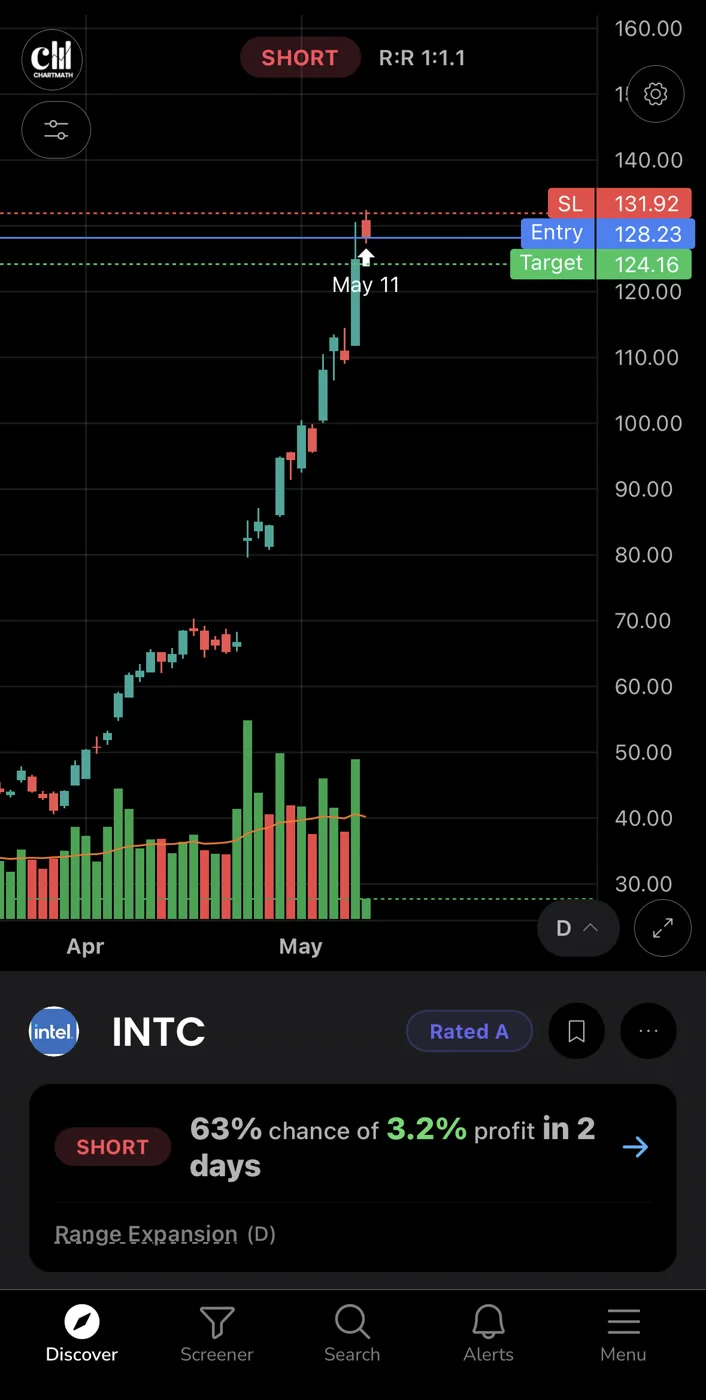
This calculation takes about 30 seconds. Skipping it is how traders end up in positions that are either too small to matter or large enough to do real damage. The signal tells you what to look at. The position sizing calculation tells you how much to risk on what you're looking at.
The Daily Chart Swing Trade Setups workflow shows how position sizing fits into a complete end-of-day routine.
5. Confirm the Setup Fits Your Plan
The last checkpoint is the most personal one. Even if the rule is clear, the timeframe fits, the Win Rate and EV look solid, and the position size is calculated, you still need to ask whether this trade fits your plan right now.
A few questions worth running through:
- Is this ticker on your watchlist? A cold ticker that fires a signal is a different risk than one you've been tracking for two weeks. You know the context on your watchlist names. You don't know it on a random alert.
- Is the broader market supportive? A long setup in a stock that's fighting a downtrending sector or a weak broad market has a lower probability of working, regardless of what the backtest says.
- Do you have the capacity to manage this trade? If you're traveling, in back-to-back meetings, or already managing three open positions, adding a fourth might not be the right call even if the setup is excellent.
ChartMath is a copilot, not an autopilot. It surfaces the setup. It shows you the evidence. You make the call. There's no broker connection, no auto-trading, no order placement. The decision is always yours, and that's by design. The app's job is to make sure you're looking at the right things. Your job is to decide whether to act.
For traders building a complete workflow around this kind of systematic evaluation, the Efficient Trading Workflow guide is worth reading alongside this one.
What Most Retail Tools Leave Out
The five checkpoints above sound straightforward. The problem is that most retail tools make it nearly impossible to run them.
TradingView is a powerful charting platform. But when a screener result fires, it doesn't show you the historical Win Rate for that specific screen, the Average Return, the EV, or the sample size. You get a ticker. You get a chart. The rest is up to you.
Finviz is a useful static screener. But it has no push alerts, no backtested metrics per signal, and no plain-English description of the filter logic behind each result. You're looking at a list with no context.
Discord and Telegram signal groups are the worst offenders. Someone posts a ticker and an entry price. There's no rule, no backtest, no sample size, no Win Rate. You have no idea whether the person posting has a 40% win rate or a 70% win rate, or whether they've been trading for three months or ten years. The highlight reel of winners is always visible. The full track record never is.
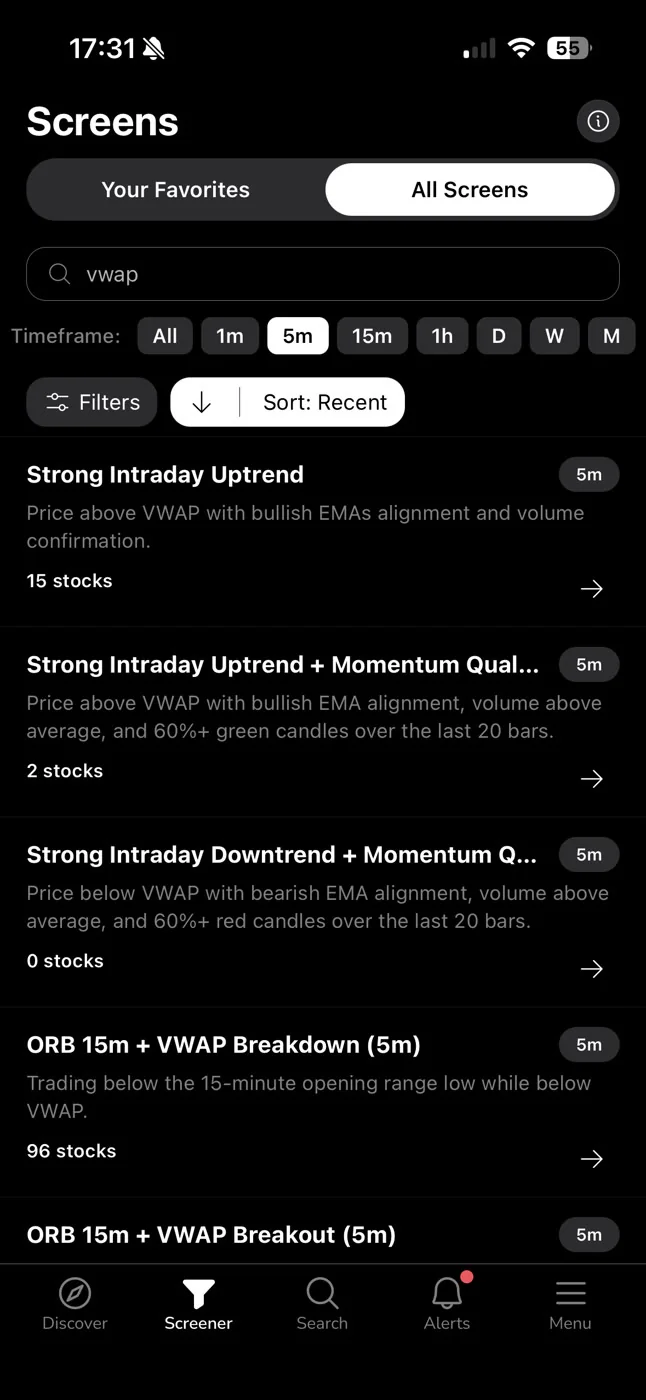
ChartMath is built around the premise that a signal without evidence is just noise. Every one of the 200+ curated screens shows its Win Rate, Average Return, EV, and sample size. The filter rules are written in plain English so you know exactly what condition a stock matched. The screens cover 500+ US equities, 100 crypto pairs, and 11 US futures, across 7 timeframes from 1-minute to monthly. Every screen has been backtested before it ships. If a screen doesn't have a verifiable track record, it doesn't make it into the app.
That's the infrastructure that makes the five-checkpoint framework actually usable. Without the data, you can't run the checks. With it, you can evaluate a signal in under two minutes and make a decision based on evidence rather than instinct.
For a direct comparison of how ChartMath stacks up against the tools most traders are already using, the Trade Ideas comparison post covers the tradeoffs in detail.
Putting It Together: A Signal Reading Checklist
Here's the full five-point checklist in one place. Print it, save it, or just run through it mentally before every trade until it becomes automatic.
- Rule: What condition did this stock match? Can you explain it in one sentence? If not, skip the trade.
- Timeframe: What timeframe did the signal fire on? Does the expected holding period fit your schedule today?
- Edge: What is the Win Rate, Average Return, and EV for this screen? What is the sample size? Is there enough historical evidence to trust the numbers?
- Size: Where is your stop? How much of your account are you risking? How many shares does that translate to?
- Fit: Is this ticker on your watchlist? Is the market context supportive? Do you have the capacity to manage this trade right now?
Two minutes. Five questions. That's the difference between reacting to a notification and making a systematic trading decision.
The alert is the trigger for your attention. The checklist is the trigger for your order.
Frequently Asked Questions
What is a trading signal?
A trading signal is a notification that a stock, crypto pair, or futures contract has matched a specific set of technical conditions. It tells you that a setup has formed, not that you should automatically buy or sell. The signal is the starting point for your evaluation, not the end of it.
What is Win Rate in trading?
Win Rate is the percentage of historical instances where a specific setup resolved in the expected direction. A 60% Win Rate means the setup has historically worked six times out of ten. Win Rate alone doesn't tell you whether a setup is profitable. You also need to know the Average Return and the sample size.
What is Expected Value (EV) in trading?
Expected Value combines Win Rate and Average Return into a single estimate of edge per trade. A positive EV means the setup has historically produced more than it has cost, on average. It's the most useful single number for evaluating whether a setup is worth trading.
Why does sample size matter for backtested signals?
A high Win Rate on a small number of historical trades can be the result of random chance rather than a real edge. A 75% Win Rate on 12 trades is not statistically meaningful. The same Win Rate on 300 trades is much more reliable. Always check the sample size before trusting any backtest metric.
Does ChartMath place trades automatically?
No. ChartMath is a trade-discovery copilot, not an autopilot. It surfaces setups and shows you the backtested evidence behind them. There is no broker connection and no order placement. You execute in your own brokerage account. The decision is always yours.
How many screens does ChartMath have?
ChartMath has 200+ curated, read-only technical screens. They cover 500+ US equities, 100 crypto pairs, and 11 US futures, across 7 timeframes. Every screen has been backtested before it ships. There is no screen builder; you browse and use the existing screens rather than creating your own.
Start Reading Signals, Not Just Receiving Them
Most traders receive dozens of alerts and act on the feeling they produce. Systematic traders read those alerts and act on the evidence behind them. The five checkpoints in this guide are the difference between the two.
ChartMath is free. If you want to see what a signal looks like when it comes with a Win Rate, an Average Return, an EV, and a plain-English rule description, download the app on iOS or Android and run through the checklist on the next signal that fires. Or browse the full screen library at chartmath.com/screens to see the filter rules and backtest data before you even set up an alert.
The alert is the trigger for your attention. What you do next is up to you.

See these setups live in ChartMath
200+ curated screens with backtest data. Free. No credit card required.