How to Trade Stocks Without Watching Screen All Day

Picture this: it's 10:47 AM on a Tuesday. You're three slides deep into a client presentation when your phone buzzes. A stock you've been watching for two weeks just broke out of a six-week consolidation on heavy volume. By the time you get back to your desk at 12:30, it's already up 6%. Entry gone.
That's not a discipline problem. That's a system problem. And the fix isn't "watch the screen more" — it's building a routine that captures high-quality setups without requiring you to be glued to a monitor from 9:30 to 4:00.
This post lays out a practical, repeatable system for traders who want to trade stocks without watching the screen all day. You'll get a concrete daily routine, the right tools for each block of time, and a clear picture of which setups actually work when you can only check your phone a few times a day.
The Real Problem: Trading Advice Built for People Who Don't Have Jobs
Most trading content is written as if your entire day is available for market watching. "Check the open, monitor price action through the first hour, watch for the midday reversal, manage your position into the close." Great advice — if you're a full-time trader with nothing else on your calendar.
The reality is different. A large share of active retail traders in the U.S. hold full-time jobs. They trade around meetings, lunch breaks, and commutes. They prep after hours and check in when they can. The market doesn't care about their schedule, but their system absolutely has to.
The good news: swing trading and even selective intraday trading are genuinely compatible with a day job — but only if you stop trying to adapt a full-time trader's workflow to a part-time schedule. You need a different system from the ground up. One built around three short daily blocks, automated scanning, and alerts that tell you something useful when they fire.
That's exactly what this guide builds. If you want a deeper look at how this fits into a broader trading workflow, this guide to building an efficient trading workflow in 2026 is a good companion read.
Why Constant Screen-Watching Is a Trap (Not a Strategy)
Here's a counterintuitive truth: more screen time often produces worse trading results, not better ones. The reason is behavioral. The longer you watch a position or a setup, the more likely you are to second-guess your plan, exit early on noise, or chase a move that doesn't meet your criteria.
High-quality technical setups, clean breakouts, VWAP reclaims, momentum surges with real volume, are identifiable in advance. They have specific, measurable characteristics. A stock breaking out of a 52-week high on 3x relative volume doesn't need you watching it tick by tick to be a valid setup. It needs you to have a system that catches it when it triggers and delivers that information to your phone in plain English.
The traders who consistently perform well with limited screen time share a few habits:
- They define their setups precisely before the market opens
- They let automated tools do the scanning and alerting
- They make decisions based on pre-set criteria, not real-time emotion
- They review results after hours, not during the trading day
This isn't a compromise. It's actually closer to how disciplined professional traders operate, with a process, not a screen habit. If you're weighing whether swing trading or day trading fits your schedule better, this breakdown of day trading vs. swing trading is worth reading before you build your system.
The 3-Block Daily Routine for Part-Time Traders
The goal is 30, 40 minutes of focused attention per day, split across three short blocks. Each block has a specific job. None of them require you to watch a screen continuously.
Block 1: Premarket Prep (10, 15 Minutes, Before 9:30 AM)
This is your highest-leverage block. You're reviewing overnight scanner results, checking which stocks on your watchlist triggered alerts, and deciding what you're willing to act on at the open or shortly after. You're not making decisions in real time, you're setting your game plan.
What to cover in premarket:
- Review push alerts that fired overnight or in premarket hours
- Check relative volume (RVOL) on any gapping stocks
- Identify 2, 3 setups worth watching, with entry levels already defined
- Set limit orders or conditional alerts so you don't need to be at your desk at the open
For a deeper look at premarket-specific strategies, these 7 premarket strategies for high-probability setups are directly applicable to this block.
Block 2: Midday Check-In (5 Minutes, Lunch or Between Meetings)
This is a triage block, not a trading block. You're checking whether any of your pre-set alerts fired, reviewing whether your open positions are behaving as expected, and deciding if anything needs attention. Most days, the answer is "nothing urgent." That's fine, that's the system working.
What to cover at midday:
- Check push alerts from the morning session
- Confirm open positions are within expected range
- Note any new setups that developed intraday for after-hours review
- Adjust stop-losses if a position moved significantly in your favor
Block 3: After-Hours Review (15, 20 Minutes, Post-Market)
This is where most of your actual trading decisions get made. The market is closed, there's no pressure, and you can evaluate setups with a clear head. You're reviewing the day's alerts, identifying tomorrow's candidates, and setting up orders for the next session.
What to cover after hours:
- Review all alerts that fired during the day
- Pull up daily charts on the top 3, 5 candidates
- Set entry orders, stop-losses, and profit targets for tomorrow
- Update your watchlist based on new setups forming
The after-hours block is so important for part-time traders that it deserves its own section, we'll cover it in detail later in this post.
Build Your Setup: The Tools That Replace Screen Time
The 3-block routine only works if the right tools are doing the heavy lifting between blocks. Here's what that infrastructure looks like.
Pre-Built Technical Screens (Not Manual Scanning)
Manual scanning, opening a screener, setting filters, refreshing, repeating, is the biggest time sink in most traders' routines. It's also the most replaceable. A good trade discovery tool runs hundreds of technical screens continuously across the entire market and surfaces only the stocks that match your criteria.
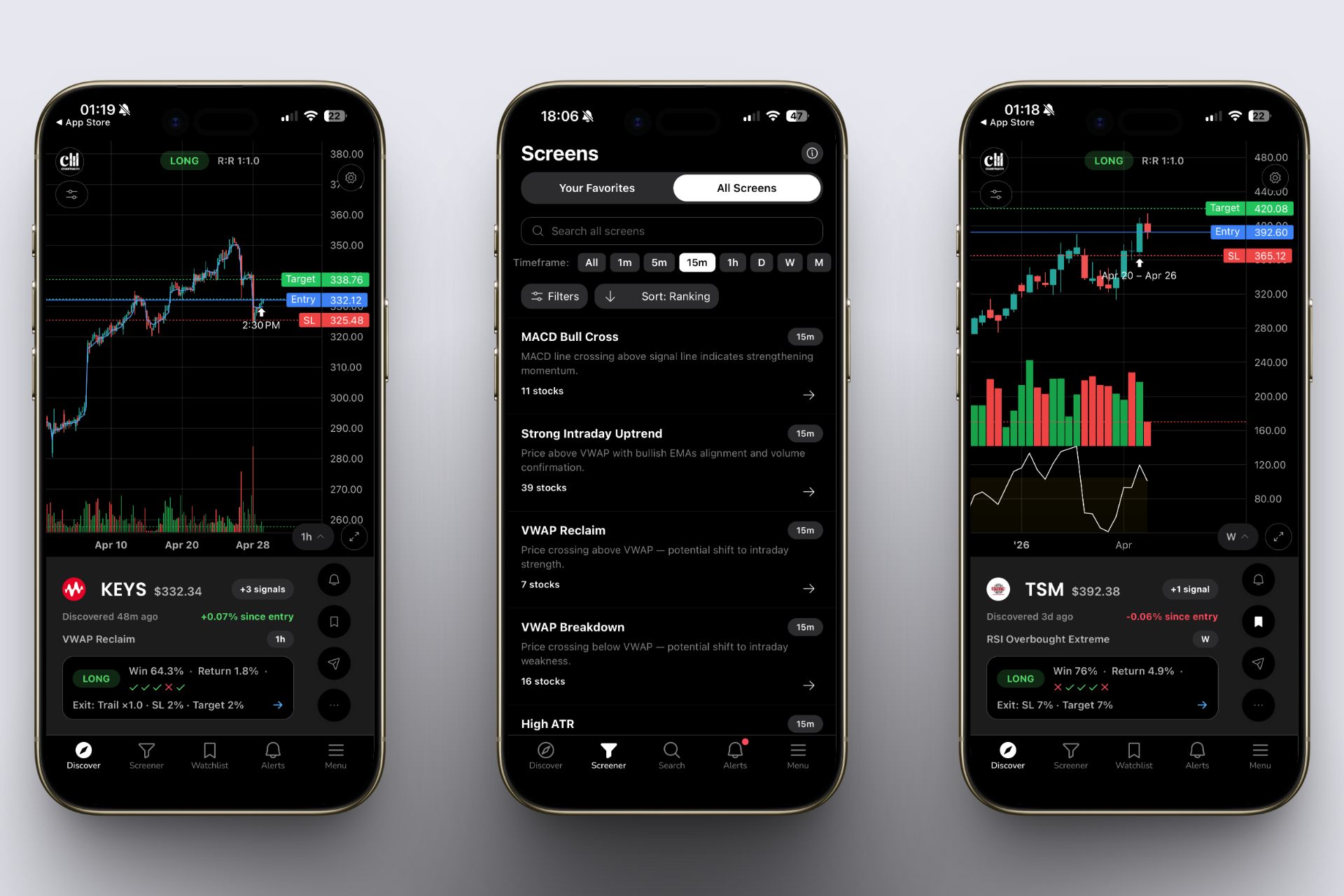
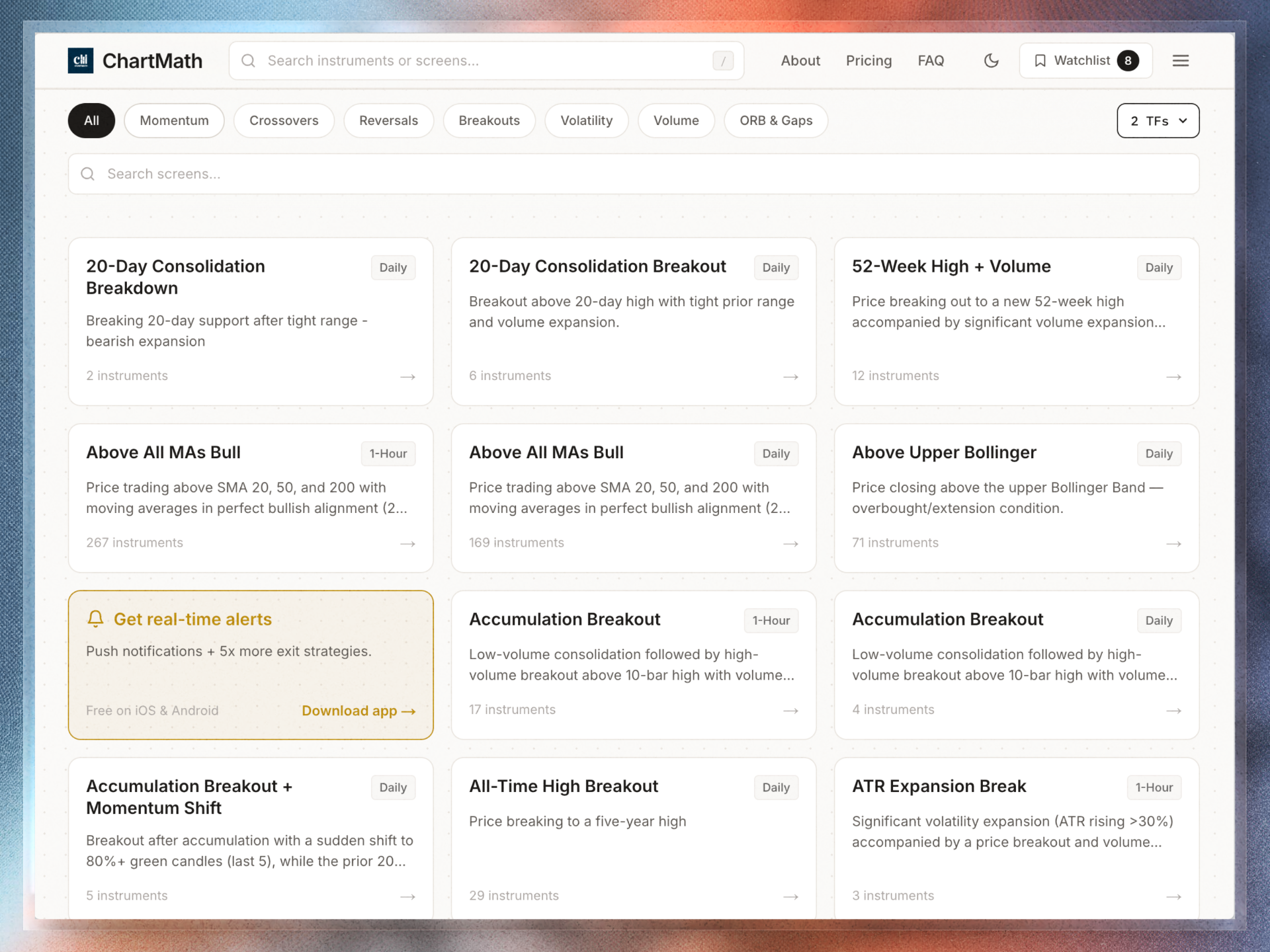
The difference between a screener and a discovery tool matters here. A screener like Finviz shows you end-of-day results for filters you set manually. A discovery tool like ChartMath runs 200+ pre-built technical screens in real time, breakouts, 52-week highs, VWAP reclaims, RVOL spikes, momentum setups, and pushes results to your phone the moment a stock qualifies. You don't need to refresh anything. You don't need to write a single line of Pine Script. The scanning happens continuously while you're in your 10 AM meeting.
For traders already using TradingView or TrendSpider for charting, ChartMath works as a discovery layer alongside those platforms, it finds the setups, you analyze and execute on the tools you already know. No need to replace what's working.
Push Alerts That Explain Themselves
Not all alerts are created equal. An alert that says "AAPL crossed $185" tells you almost nothing useful. An alert that says "AAPL broke above a 6-week consolidation on 2.4x relative volume, matching a setup with a 62% win rate over the last 3 years", that's actionable.
The best alerts include:
- The setup type, what pattern or condition triggered
- The plain-English reason, why this matters technically
- Backtest context, historical win rate and average return for this setup
- Volume confirmation, whether the move has real participation behind it
This is what separates a useful mobile alert from noise. When you're checking your phone between meetings, you need to make a go/no-go decision in 30 seconds. An alert with context makes that possible. An alert without it just adds to the pile. For more on building an alert system that doesn't bury you, this guide to integrating trading alerts with your charting platform covers the mechanics in detail.
Backtested Setups: Know the Edge Before You Enter
One of the biggest advantages of a system-driven approach is that you can validate your setups before you ever take a trade. Backtesting tells you how a specific pattern has performed historically, win rate, average return, maximum drawdown, and how often it produces a meaningful move versus a false signal.
When you're trading with limited screen time, this matters even more. You can't babysit a position through every wiggle. You need setups with a genuine statistical edge and clear invalidation levels. This complete guide to building winning backtesting strategies walks through how to evaluate that data properly.
What to Scan For: 5 Setup Types That Work Without Intraday Babysitting
Not every setup is compatible with a part-time trading schedule. Scalping 1-minute charts requires constant attention. But these five setup types work well when you can only check in periodically.
1. Daily Chart Breakouts (52-Week Highs and Consolidation Breaks)
A stock breaking out of a multi-week consolidation on the daily chart is one of the cleanest setups for part-time traders. The entry is clear (above the consolidation high), the stop is defined (below the base), and the move typically plays out over days, not minutes. You don't need to watch it tick by tick. You need to catch the breakout day and manage the position with a trailing stop.
Scanning for 52-week high breakouts with volume confirmation is a reliable way to find these. The key filter: relative volume above 1.5x on the breakout day, combined with a clean base of at least 3, 4 weeks.
2. VWAP Reclaims on the 1-Hour Chart
A stock that loses VWAP intraday and then reclaims it on volume is a high-probability long setup, especially when it happens in the first two hours of trading. On the 1-hour chart, this setup is visible enough that a midday check-in can catch it before the move extends.
The mechanics of VWAP as a trading tool are worth understanding deeply if you're going to use it. This guide to VWAP trading covers entries, exits, and how to use it alongside other indicators. For a comparison of VWAP against RVOL and ORB, this breakdown of which technical indicators work best is useful context.
3. RVOL Spikes as Momentum Confirmation
Relative volume (RVOL) is one of the most reliable early signals that something meaningful is happening in a stock. When RVOL spikes to 2x, 3x, or higher early in the session, it often precedes a sustained directional move. You don't need to watch the stock, you need an alert that fires when RVOL crosses your threshold, so you can evaluate the setup on your next check-in.
4. Opening Range Breakout (ORB) Alerts
The ORB setup, a break above or below the first 5, 15, or 30 minutes of trading, is one of the most backtested intraday setups in existence. For part-time traders, the key is getting an alert when the breakout happens, then evaluating it at lunch. Many ORB moves extend well into the afternoon, so a midday entry on a confirmed breakout is still viable.
5. End-of-Day Momentum Setups for Next-Morning Entry
Stocks that close near their highs on strong volume, especially after breaking out of a pattern, often continue the next morning. Scanning for these in your after-hours review block gives you a clean list of candidates to watch at the open. This is the most natural setup type for traders who do their best work after the market closes.
How to Handle Alerts Without Getting Buried in Noise
Alert fatigue is real. If your phone buzzes 80 times a day with low-context notifications, you'll start ignoring all of them, including the ones that matter. The solution isn't fewer alerts; it's better alerts, organized intelligently.
Quality Over Quantity
The goal is 3, 7 actionable alerts per day, not 80. That means filtering aggressively at the setup level. Every alert should represent a setup you'd actually consider trading, not just any stock that crossed a moving average. Pre-built screens that combine multiple conditions (price action + volume + indicator alignment) naturally produce fewer, higher-quality signals than single-condition filters.
Watchlist-Based Alerts vs. Market-Wide Noise
There are two approaches to alerts: market-wide scanning (alerts for any stock that matches a setup) and watchlist-based alerts (alerts only for stocks you're already tracking). For part-time traders, a hybrid works best. Use market-wide scanning to discover new candidates, then add the best ones to a watchlist for tighter, more specific alerts.
Triage in 30 Seconds
When an alert fires during your workday, you need to make a quick decision: worth acting on now, worth reviewing tonight, or ignore. A well-structured alert makes this easy. If the alert includes the setup type, the plain-English reason, and the backtest context, you can triage it in under 30 seconds without pulling up a chart. That's the standard every alert in your system should meet.
The After-Hours Review: Your Most Important 20 Minutes
For traders with day jobs, the post-market window is where the real work happens. The market is closed, there's no FOMO, and you can evaluate setups with the full day's data in front of you. This is where part-time traders build their edge.
What to Review Each Evening
Start with the alerts that fired during the day. For each one, pull up the daily chart and ask three questions: Is the setup still valid? Is there a clean entry level for tomorrow? What's my stop and target?
You're not trying to analyze 50 stocks. You're trying to identify 2, 3 high-conviction setups for the next session. Quality over quantity applies here too.
Setting Orders Before Bed
One of the most powerful habits a part-time trader can build is setting limit orders and conditional alerts before the market opens. If you've identified a breakout candidate in your evening review, set a buy limit order at the breakout level with a stop already defined. If the stock triggers your entry while you're in a meeting, the order executes automatically. You don't need to be watching.
This is how you stop missing entries. Not by watching more, by deciding in advance and letting the system execute.
The Compounding Effect of Consistent Review
Traders who do a disciplined 20-minute after-hours review every weeknight build something valuable over time: pattern recognition. You start to see which setups from your scanner actually follow through, which ones fail, and what conditions separate the two. That feedback loop, alert fires, you review, you track the outcome, is how you refine your system without spending more time in front of a screen.
For a complete framework around this kind of nightly routine, this 30-minute daily guide for swing traders with busy schedules is worth bookmarking.
Frequently Asked Questions
Can I really trade successfully without watching the market all day?
Yes, with the right setup type and tools. Swing trading on daily charts, in particular, is well-suited to part-time schedules because setups develop over days, not minutes. The key is automating the scanning and alerting so you're not manually hunting for setups during the day. Many consistent traders check their phone a few times a day and do their real work after hours.
What's the best trading style for someone with a day job?
Swing trading is the most compatible with a 9-to-5 schedule. Positions are held for days to weeks, entries are based on daily chart setups, and you don't need to monitor intraday price action constantly. That said, some part-time traders also take selective intraday trades, specifically ORB setups and VWAP reclaims, using pre-set limit orders and alerts rather than active monitoring.
How do I avoid missing entries while I'm in meetings?
Two tools solve this: pre-set limit orders and push alerts. If you've identified a breakout level in your premarket prep, set a limit order at that level before the market opens. If the stock hits your entry while you're unavailable, the order executes. Push alerts from a real-time scanner let you triage opportunities during brief breaks without needing to pull up charts.
Do I need to code to set up alerts and screens?
Not with the right tool. Platforms like TradingView require Pine Script to build custom alerts, which is a real barrier for traders who aren't developers. ChartMath offers 200+ pre-built technical screens, breakouts, VWAP, RVOL, ORB, momentum setups, with no coding required. You pick the setups that match your style and the system handles the rest.
What's the difference between a screener and a trade discovery tool?
A screener is reactive, you set filters, run a scan, and review results manually. A trade discovery tool is proactive, it continuously scans the market across hundreds of conditions and pushes alerts to you when something matches. For part-time traders, the distinction matters a lot. You don't have time to refresh a screener every 30 minutes. You need the system to find setups and bring them to you. For more on how to use screeners effectively, this guide to using stock screeners for day trading covers the fundamentals.
Start Trading Smarter, Not Longer
The traders who figure out how to trade stocks without watching the screen all day aren't cutting corners, they're building better systems. They've replaced manual scanning with automated discovery, low-context alerts with explainable signals, and reactive screen-watching with a disciplined 3-block daily routine.
ChartMath was built specifically for this workflow. It scans 200+ technical setups in real time, sends push alerts to your phone with plain-English explanations and backtest data behind every signal, and works alongside the charting tools you already use. No Pine Script. No alert spam. No staring at screens.
If you're ready to see what a system like this looks like in practice, watch the ChartMath demo to see how the scanning and alerting works end-to-end. Or, if you want to start finding setups today, download the ChartMath app and run your first scan in minutes. You can also explore the full library of pre-built screens directly at chartmath.com/screens, no coding required.
The market will keep moving while you're in meetings. The question is whether your system is set up to catch it.

See these setups live in ChartMath
200+ curated screens with backtest data. Free. No credit card required.