Best Stock Screener for Technical Traders (Free & Paid, 2026)
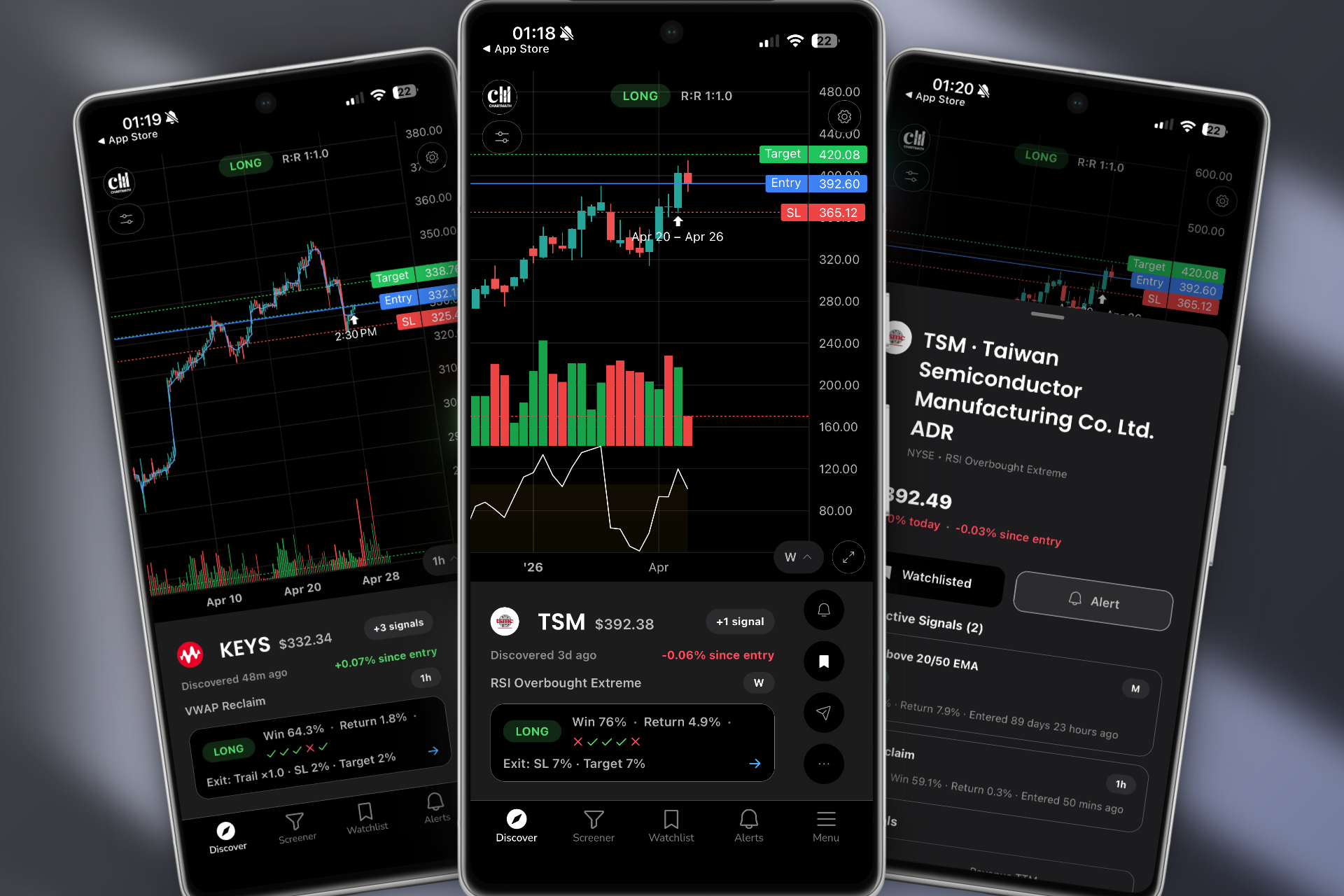
Which stock screener is best for technical traders in 2026? ChartMath is the only option in this comparison that combines free access, curated technical screens, and historical backtest results attached to every screen. Finviz is a useful free choice for delayed end-of-day filtering, TradingView leads for charting, and Trade Ideas serves active desktop traders who need a more advanced scanner.
We compared six free and paid stock screeners across the decisions that matter in practice: live scanning, backtest evidence, mobile alerts, coding requirements, and price. Features and prices were checked in July 2026. Backtests are evidence about past setups, not a promise of future returns.
Why the Right Stock Screener Matters in 2026
The average stock screener isn't built for the way active technical traders actually work. Most platforms were designed for fundamental investors who filter by P/E ratios and market cap. But if you're trading ORB breaks, VWAP reclaims, or momentum spikes, you need a tool that speaks your language, in real time, on your phone, with context about why a setup triggered.
The cost of using the wrong screener is real. Alert fatigue from low-quality notifications trains you to ignore your alerts. End-of-day-only updates mean you miss intraday momentum plays entirely. Platforms that require coding (looking at you, Pine Script) lock out traders who don't have a software engineering degree. And desktop-only tools leave you blind the moment you step away from your desk.
The best stock screener for technical traders in 2026 needs to do three things well: scan the entire market continuously, surface only high-quality setups with proven edges, and deliver those setups to you wherever you are. Let's look at what separates the best from the rest.
What Makes the Best Stock Screener for Technical Traders?
Before the platform-by-platform comparison, it's worth establishing the criteria that actually matter. Not all screeners are created equal, and the features a swing trader needs differ from what a day trader needs.
Real-Time vs. End-of-Day Scanning
For day traders and intraday momentum players, real-time scanning is non-negotiable. If your screener updates once at the close, you're not getting trade alerts, you're getting a history lesson. The best stock screeners scan continuously through the session, flagging setups as they develop on 1-minute, 5-minute, and 15-minute timeframes. Swing traders have more flexibility, but even they benefit from intraday signals that confirm a daily-chart setup before the close.
Pre-Built Screens vs. Custom Coding
TradingView's Pine Script is powerful if you know how to use it. Most traders don't, and they shouldn't have to. The best stock screeners ship a library of pre-built technical screens covering the setups that actually move stocks: ORB (Opening Range Breakout), VWAP reclaims, relative volume spikes, momentum divergences, and breakout patterns. Pre-built screens get you scanning in minutes, not weeks.
Backtest Data: Knowing Your Edge Before You Trade
Here's a question most screeners can't answer: does this setup actually work? Backtest validation, showing historical win rates, average returns, and drawdown data for each screen, is what separates a signal with a real edge from random noise. Without it you're flying blind. For more on reading those numbers correctly, see our guide on how to read a backtest before you size it and how to build winning backtesting strategies.
Alert Quality: Context vs. Spam
Getting 200 alerts a day is worse than getting zero. Alert fatigue is a real problem, and it's caused by platforms that fire notifications without context. The best stock screener sends fewer, smarter alerts, ones that tell you what triggered, why it matters, and what the historical edge looks like. That's actionable intelligence, not noise.
Mobile Accessibility
Trading doesn't stop when you leave your desk. Whether you're in a meeting, at lunch, or away from your monitors, your screener should be in your pocket. A mobile-first design with push notifications means you never miss a high-quality setup just because you weren't sitting in front of your computer.
Best Free and Paid Stock Screeners Compared (2026)
Use the table to choose the workflow you actually need. ChartMath focuses on finding curated, backtested setups; TradingView focuses on chart analysis; Finviz offers broad filtering; and Trade Ideas focuses on high-powered desktop scanning. The key distinction is whether backtest evidence appears beside the screen result or requires a separate tool.
| Feature | ChartMath | TradingView | Trade Ideas | Finviz | TrendSpider | Tickeron |
|---|---|---|---|---|---|---|
| Real-Time Scanning | ✅ | ✅ (paid) | ✅ | ⚠️ Elite only (free is delayed) | ✅ | ✅ |
| Pre-Built Technical Screens | ✅ 200+ | ⚠️ No-code, few presets | ✅ | ✅ (basic) | ✅ (scanners) | ✅ (AI robots) |
| Backtest Data on Every Screen | ✅ | ❌ | ⚠️ Separate tool | ❌ | ⚠️ Separate tool | ⚠️ Black-box AI |
| Mobile App with Push Alerts | ✅ | ✅ | ❌ Desktop + web | ⚠️ Email alerts, no app | ✅ | ✅ |
| No Coding Required | ✅ | ⚠️ Pine for custom scans | ✅ | ✅ | ✅ | ✅ |
| Alert Context / Explanation | ✅ | ❌ | ❌ | ❌ | ❌ | ⚠️ Score only |
| Starting Price (2026) | Free | Free / $14.95/mo | $127/mo (~$89 annual) | Free / $39.50/mo Elite | From ~$33/mo (annual) | From $60/mo |
The table tells a clear story. Most platforms are strong in one or two areas but fall short where it counts for active technical traders. The one line where a single platform stands alone is backtest data on every screen: TradingView and Finviz don't offer it, Trade Ideas and TrendSpider tuck it behind a separate strategy-builder, and Tickeron's version is a black-box AI score. Let's dig into each platform.
ChartMath: The Mobile-First Screener With Backtest Data on Every Screen
ChartMath was built from the ground up to solve the problems that frustrate technical traders most: missed entries, alert spam, no context, and being chained to a desktop. It isn't trying to be a charting platform. It's a trade discovery engine that works alongside your existing tools. Here's a two-minute look at how it finds and delivers setups:
200+ Pre-Built Technical Screens
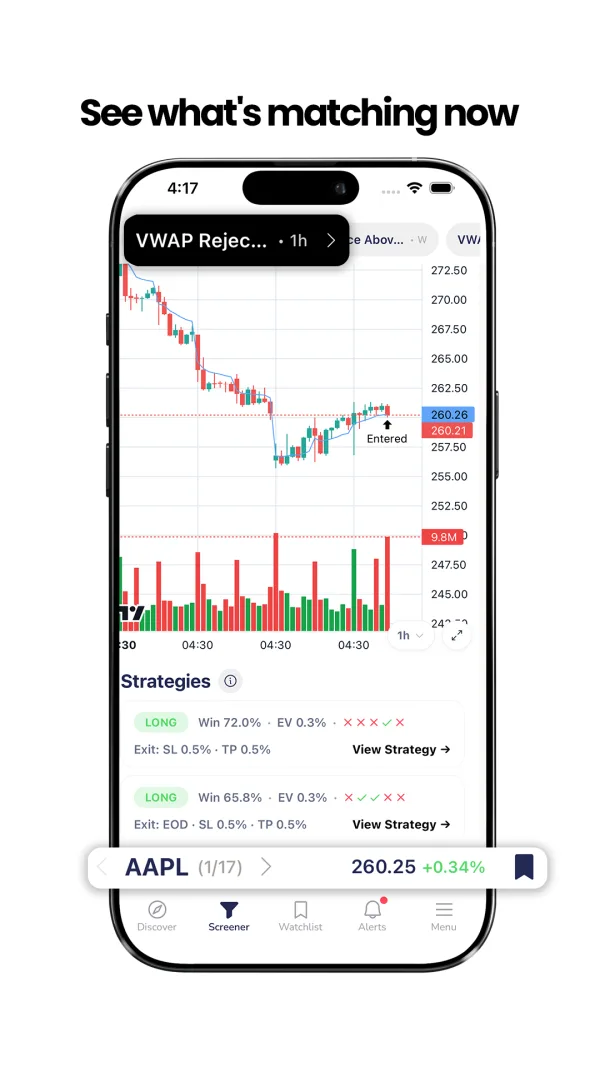
ChartMath scans the entire market continuously across more than 200 curated technical setups. These aren't generic filters, they're purpose-built screens for the setups technical traders actually use: Opening Range Breakouts (ORB), VWAP reclaims, Relative Volume (RVOL) spikes, momentum breakouts, 52-week highs, and more. No Pine Script. No custom formula building. You open the app and the market is already being scanned for you. For a deeper look at how those indicators compare, see our breakdown of VWAP vs RVOL vs ORB.
Backtest Validation Built Into Every Screen
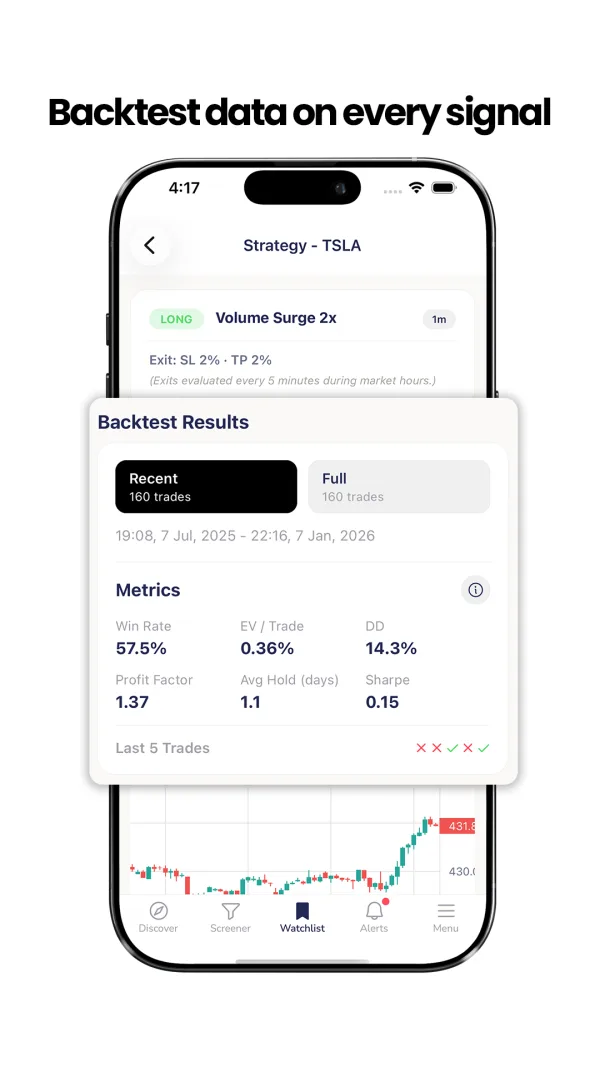
This is where ChartMath separates itself from every other platform on this list. Every screen comes with historical backtest data, win rates, average returns, and drawdown statistics, so you know the edge behind a setup before you trade it. When an alert fires you're not guessing whether the pattern works, you have the data to back it up. The others either don't show backtest stats at all, or make you build a strategy in a separate tool to get them. ChartMath attaches them to the screen itself, out of the box.
Intelligent Push Alerts With Plain-English Explanations
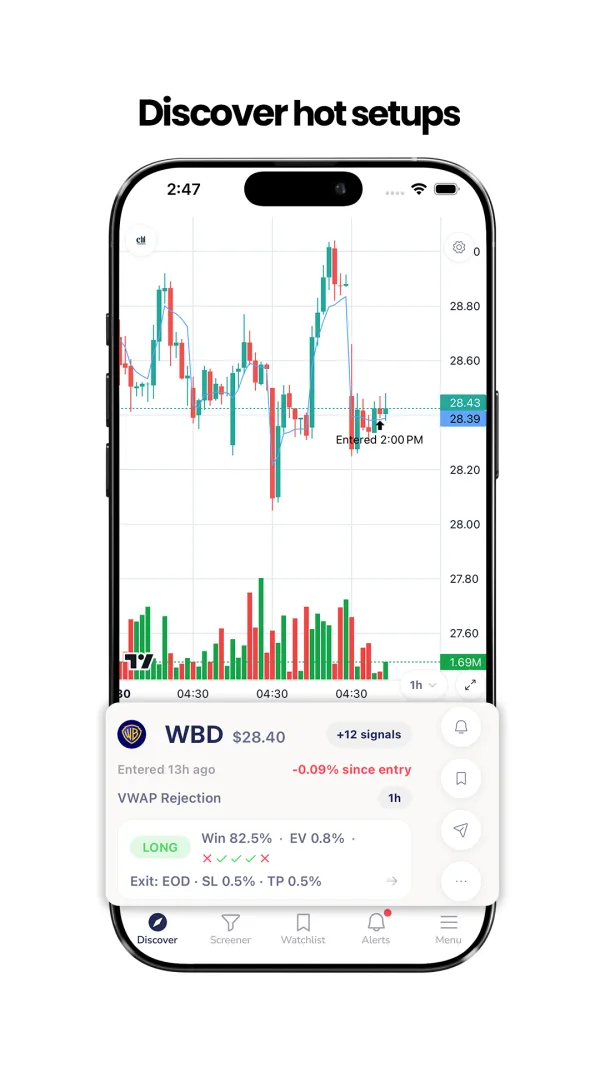
ChartMath's alerts don't just tell you a stock triggered a screen. They tell you why it triggered, what the setup means, and what the historical performance looks like. That's especially valuable for traders still building their technical-analysis knowledge. Instead of a cryptic "AAPL alert," you get a clear explanation of the setup, the timeframe, and the edge, delivered as a push notification to your phone.
TikTok-Style Swipe Interface for Fast Discovery
ChartMath's mobile interface uses a swipe-based discovery feed, think TikTok for stock setups. You swipe through ranked setups in the Discover tab, filter by strategy in the Screener tab, or track your favorites in the Watchlist tab. It's built for speed: you can evaluate a setup, check the backtest data, and add it to your watchlist in seconds, all from your phone while you're away from your desk. ChartMath supports multi-timeframe analysis from 1-minute to weekly charts, so it's equally useful for day traders catching intraday momentum and swing traders building end-of-day watchlists.
Pricing and Free Access
You can browse 200+ screens and live stock data free on the web at chartmath.com, no signup required, to see exactly what the screener surfaces. The mobile app is free. That's a fraction of what desktop scanners like Trade Ideas charge, with backtest data and mobile alerts those platforms don't bundle.
Best for: Day traders who need real-time ORB, VWAP, and RVOL alerts on mobile. Swing traders who want backtested end-of-day breakout signals. Beginners who need pre-built screens and plain-English explanations without any coding.
TradingView: Best-in-Class Charts, Capable No-Code Screener
TradingView is the gold standard for charting. Its community, indicator library, and visual tools are unmatched, and its mobile apps are genuinely full-featured. But as a proactive stock screener for technical traders, it has real limitations.
Strengths
- World-class charting with thousands of community indicators
- Large, active community sharing ideas and scripts
- A solid no-code screener (point-and-click filters) plus a free Basic tier and low $14.95/mo entry plan
- Full native iOS and Android apps with push alerts
Weaknesses
- Custom scans and backtesting require Pine Script, a real barrier for most traders. The built-in screener is capable but light on ready-made technical setups.
- It's not a proactive discovery engine, it doesn't continuously surface new setups across the market for you
- No backtest data attached to screener results or alerts
- Alert context is minimal, you get a notification, not an explanation
TradingView is an excellent charting companion, and ChartMath is designed to work alongside it, not replace it. Use ChartMath to discover backtested setups, then pull up TradingView to confirm the chart before you enter. For more on wiring that together, read our guide on how to integrate trading alerts with your charting platform.
Best for: Chart analysis and visualization. Traders who already know what stocks they want to watch and need a powerful charting environment.
Trade Ideas: Powerful AI Scanning, Desktop-Bound and Pricey
Trade Ideas is one of the most powerful real-time scanners on the market. Its Holly AI system generates trade ideas automatically, and the scanning engine is genuinely impressive for professional day traders.
Strengths
- Powerful real-time scanning with extensive filter options
- Holly AI generates automated trade suggestions from backtested strategies
- Large library of pre-built scans for active traders
Weaknesses
- No native mobile app, it's a Windows desktop platform plus browser-based web access, so push-to-pocket alerts aren't really there
- Starts at $127/month (about $89/month billed annually), the most expensive option on this list by a wide margin
- Complex interface that overwhelms beginners and even intermediate traders
- Backtest stats live in a separate OddsMaker tool rather than being attached to every scan result
Best for: Professional day traders with a dedicated desk, a real budget, and the time to learn a complex platform. If that's not you, see our take on the best Trade Ideas alternative for swing traders.
Finviz, TrendSpider and Tickeron: Strong in Their Niches
These three each serve a specific use case well, but none of them is the best all-around stock screener for active technical traders who need real-time, mobile-first discovery with backtest context.
Finviz
Finviz is a popular starting point because it's free, visual, and easy to use. Its heatmap and screening tools are genuinely useful for a broad market overview. But the free tier is delayed (roughly 15 to 20 minutes), not real-time, real-time data and pre/after-hours scanning require Finviz Elite at $39.50/month, and alerts are email-based with no native mobile app. For momentum traders who need to catch setups as they develop, it isn't built for the job. It's great for fundamental screening and market visualization, not for catching ORB breaks at 9:35 AM. If that's your use case, here's our pick for the best Finviz alternative for intraday traders.
TrendSpider
TrendSpider is an impressive automated technical-analysis platform with trendline detection, multi-timeframe analysis, a strong strategy backtester, and (yes) native mobile apps with push alerts. Its real limitation for discovery is workflow: scanning and backtesting are separate steps. You build a scan, then build and test a strategy to learn its edge, the stats aren't attached to each raw scan result the way they are in ChartMath. If you want to deeply analyze stocks you're already tracking and are happy to build your own backtests, TrendSpider is excellent. If you want backtested setups surfaced to you automatically, that's extra legwork.
Tickeron
Tickeron uses AI-driven pattern recognition to score stocks and run automated robots, and it does have native mobile apps with push notifications. The catch is transparency: its AI scoring is largely a black box. You get a score and a published robot win rate, but not the underlying, screen-level backtest stats you can interrogate yourself, and pricing starts at $60/month. For traders who want to understand and trust the data behind every alert, that opacity is a real drawback.
Best for: Finviz, end-of-day fundamental and technical filtering plus market visualization. TrendSpider, deep chart analysis and DIY backtesting on a focused watchlist. Tickeron, AI-assisted pattern recognition and automated robots.
Best Stock Screener for Day Trading in 2026
Day traders need real-time scanning, mobile push alerts, and intraday setups like ORB, VWAP, and RVOL. You can't watch everything at once, and you can't be chained to your desk. Among the 2026 screeners, ChartMath is the best fit: continuous market scanning, intelligent push alerts, and a mobile-first interface, with backtest data on every intraday screen so you know the edge before you click buy. Trade Ideas is the power-user alternative if you have a desktop setup and the budget for it. For the specific setups that matter most intraday, see our breakdown of 15 proven technical setups every day trader should know and our ORB trading strategy guide, or compare the field in our best real-time stock scanner for day trading roundup.
Best Stock Screener for Swing Trading in 2026
Swing traders need end-of-day breakout signals, daily and weekly timeframe screens, and a watchlist you can review on your own schedule. ChartMath's Screener tab filters by strategy and timeframe and delivers swing setups before the close, so you can review them in the evening, with the backtest edge context that a tool like Finviz lacks. Finviz can supplement this with fundamental filters. If you trade around a day job, this is exactly the workflow in our swing trading with a full-time job guide and our daily-chart swing trade scanner workflow. iPhone users should also see the best stock alert app for iPhone swing traders.
Best Stock Screener for Beginners in 2026
Beginners need pre-built screens, plain-English explanations, and backtest data that shows why a setup works, without writing a single line of code. ChartMath's alerts explain each setup in plain language, and the backtest stats show the historical edge, so it doubles as the fastest way to learn technical analysis by seeing real setups in real time with real data behind them. If you're still deciding what kind of trader you are, start with day trading vs swing trading, then read how to choose a stock screener with backtest data.
| Trader Type | Top Pick | Why |
|---|---|---|
| Day Trader | ChartMath | Real-time ORB/VWAP/RVOL alerts, mobile push, backtest data on 200+ intraday screens |
| Swing Trader | ChartMath + Finviz | Backtested breakout screens + fundamental filters for multi-day positions |
| Beginner | ChartMath | Pre-built screens, plain-English alerts, backtest data, no coding required |
| Chart Analyst | TradingView | Best-in-class charting for stocks you're already watching |
| Professional Desk Trader | Trade Ideas | Advanced scanning power for traders with budget and a dedicated setup |
How to Build a Complete Trading Workflow Around Your Screener
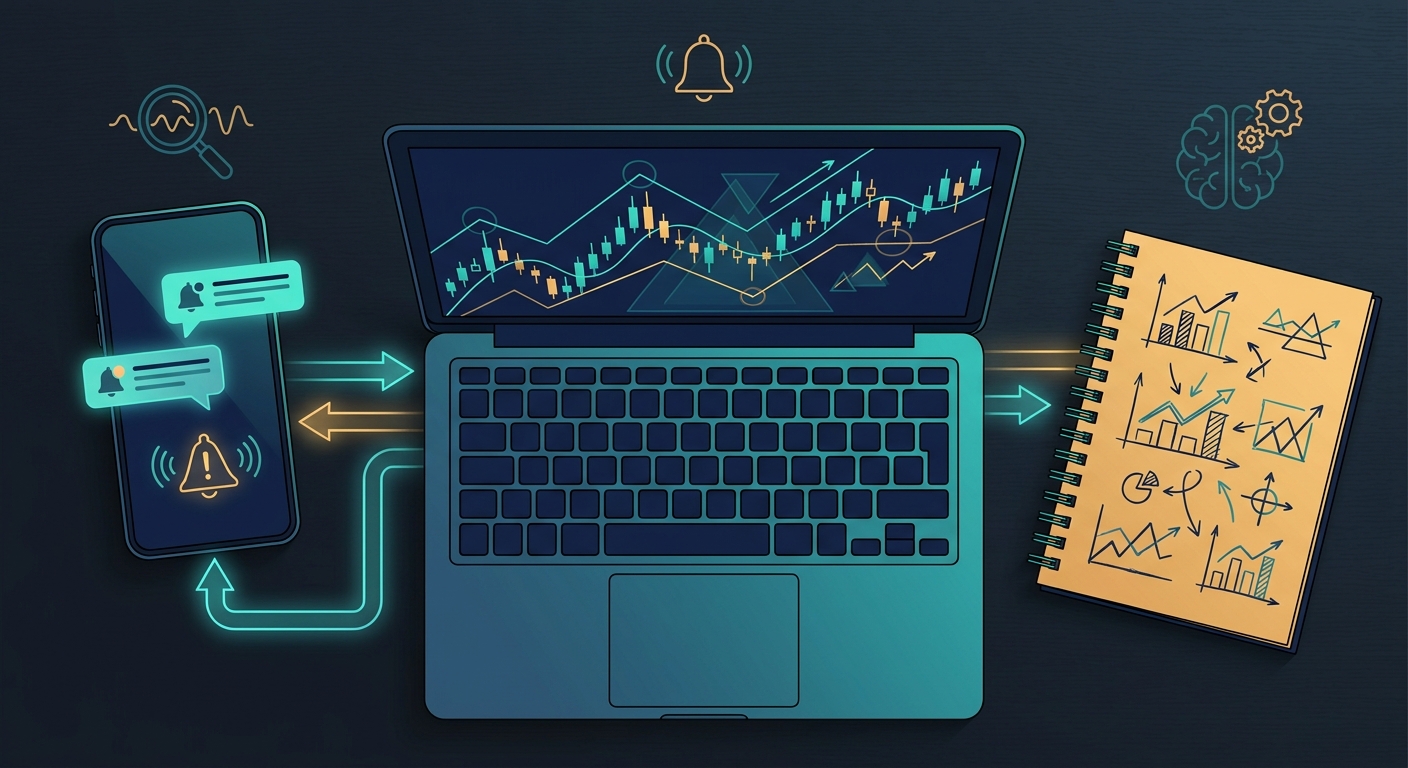
The best stock screener is only as good as the workflow it fits into. Here's how to build a complete technical trading routine around your screener, whether you're a day trader, swing trader, or somewhere in between.
Premarket Scanning Routine
Before the open, your screener should surface stocks with elevated premarket volume, gaps with relative-volume spikes, and setups approaching key technical levels. ChartMath's premarket scanner flags these automatically, so you build your morning watchlist in minutes rather than hours. For a structured approach, see our guide on premarket trading: 7 strategies to find high-probability setups.
Intraday Alert Management
During market hours, your screener should do the heavy lifting. Real-time alerts for ORB breaks, VWAP reclaims, and RVOL spikes should arrive on your phone with enough context to make a quick decision, even when you're not at your desk. The goal is to cut the time between setup trigger and trade evaluation to seconds, not minutes. Every minute of delay on a momentum play costs you entry quality. For execution detail, read our guide on intraday trading: how to execute 1-minute to 15-minute plays.
End-of-Day Swing Trade Review
Swing traders can use end-of-day signals to build a watchlist for the next session. Look for stocks that triggered breakout screens on daily or weekly timeframes, then review the charts on your charting platform to confirm. This 30-minute routine is all you need to stay on top of swing opportunities without spending your whole evening scanning.
Pairing Your Screener With a Charting Platform
The most effective technical traders use their screener for discovery and their charting platform for confirmation. ChartMath surfaces the setup and the backtest context. TradingView (or your preferred charting tool) lets you zoom in, check key levels, and plan your entry and exit. The tools are complementary, not competing. For the full system, read our guide on how to build an efficient trading workflow in 2026.
Frequently Asked Questions About Stock Screeners
What is a stock screener and how does it work?
A stock screener filters the entire market on specific criteria, price, volume, technical indicators, chart patterns, and more, to surface stocks that match a particular setup. The best stock screeners scan continuously in real time and alert you when a stock meets your criteria, so you don't have to manually review thousands of charts.
What is the best stock screener for day trading in 2026?
For day trading you want real-time scanning, mobile push alerts, and intraday setups like ORB, VWAP, and RVOL. ChartMath fits this best on mobile, with backtest data on every screen, while Trade Ideas is the high-end desktop option. Whichever you pick, prioritize real-time data (Finviz's free tier is delayed) and alert quality over the raw number of filters.
What is the best stock screener for swing trading in 2026?
The best swing-trading screener filters for daily and weekly setups, breakouts above resistance, 52-week highs, momentum divergences, and volume confirmation, and lets you review a watchlist on your own schedule. ChartMath's multi-timeframe screens deliver end-of-day signals with backtest context, which is exactly what a swing trader balancing a day job needs.
What is the best free stock screener?
For end-of-day fundamental and technical filtering, Finviz's free tier is a solid starting point (note it's delayed, not real-time). To explore real backtested technical screens for free, you can browse ChartMath's 200+ screens and live stock data on the web with no signup, and the mobile app is free so you can test real-time alerts on your phone.
Can I use a stock screener on my phone?
Several can. TradingView, TrendSpider, and Tickeron all have mobile apps. Trade Ideas and Finviz do not have a true screener app with push alerts. ChartMath is built mobile-first, with a native app and push notifications that deliver setup alerts (and their backtest context) directly to your phone. You can download the ChartMath app and start receiving real-time technical alerts wherever you are.
What technical indicators should a stock screener include?
At minimum, a strong technical screener should cover VWAP (Volume Weighted Average Price), RVOL (Relative Volume), ORB (Opening Range Breakout), RSI, moving-average crossovers, and breakout patterns. ChartMath covers all of these and more across its 200+ pre-built screens. For how they compare, see our guide on VWAP vs RVOL vs ORB.
How is ChartMath different from a traditional stock screener?
Traditional screeners are passive, you set filters and check results. ChartMath is proactive, it continuously scans the market and pushes alerts when high-quality setups emerge. It also provides backtest data on every screen, plain-English explanations for every alert, and a mobile-first interface for traders who can't sit at a desk all day. It's less a screener and more a trade discovery engine.
Stop Missing Setups, Find Your Best Stock Screener for 2026
The right stock screener doesn't just save you time, it changes how you trade. Instead of refreshing charts and chasing setups you already missed, you get intelligent alerts the moment a high-quality technical setup emerges. That's the difference between reactive trading and proactive trading.
For most technical traders in 2026, the best stock screener combines real-time market scanning, pre-built technical screens with backtest validation, and mobile-first push alerts that keep you in the game even when you're away from your desk. ChartMath was built to do exactly that, and it's the only platform on this list that delivers all three, with backtest data on every screen, without requiring a coding degree or a professional budget.
Ready to stop missing high-quality setups? Watch the ChartMath demo to see how the platform discovers and delivers technical setups in real time, browse 200+ screens free at chartmath.com, or download the ChartMath app and start for free today. Your next great trade is already setting up. Make sure you're there to catch it.
Frequently asked questions
What are the best stock screener tools for technical traders?
The best screeners for technical traders do three things: scan the whole market continuously, ship pre-built technical screens like ORB, VWAP, and relative volume, and deliver alerts with enough context to act on. This guide compares six 2026 options on those criteria, including TradingView, Trade Ideas, Finviz, TrendSpider, and Tickeron.
Can you get a good stock screener without paying?
For free end-of-day fundamental and technical filtering, Finviz's free tier is the usual pick, though its data is delayed roughly 15 to 20 minutes rather than real-time. TradingView offers a free Basic tier for charting. ChartMath is a free stock screener app for iOS and Android with 200+ prebuilt screens, no credit card required.
What features matter most in a day trading screener?
The best day-trading screener for 2026 is one with real-time scanning, mobile push alerts, and intraday setups like opening range breakouts, VWAP reclaims, and relative volume spikes. Prioritize genuine real-time data over filter count, since a delayed free tier cannot flag a 9:35 AM breakout. Trade Ideas is the high-end desktop option.
How is a swing trading screener different from a day trading one?
The best swing-trading screener filters daily and weekly timeframes for breakouts, 52-week highs, and volume confirmation, and lets you review a watchlist on your own schedule. End-of-day signals matter more than tick-by-tick speed here. Finviz can add fundamental filters, and TrendSpider suits deeper chart analysis on a focused watchlist.
What is the best stock screener for beginners in 2026?
The best beginner screener ships pre-built screens, plain-English explanations of each setup, and backtest data showing how that setup performed historically, with no code required. Avoid tools that need scripting for custom scans, such as TradingView's Pine Script, and skip complex professional desktop platforms that overwhelm new traders.
What should I look for in a pre-market stock scanner?
A pre-market scanner should surface elevated pre-market volume, gaps paired with relative volume spikes, and stocks approaching key technical levels, so your morning watchlist takes minutes to build. Note that Finviz restricts pre-market and after-hours scanning to its paid Elite tier at $39.50 per month.

See these setups live in ChartMath
200+ curated screens with backtest data. Free. No credit card required.